
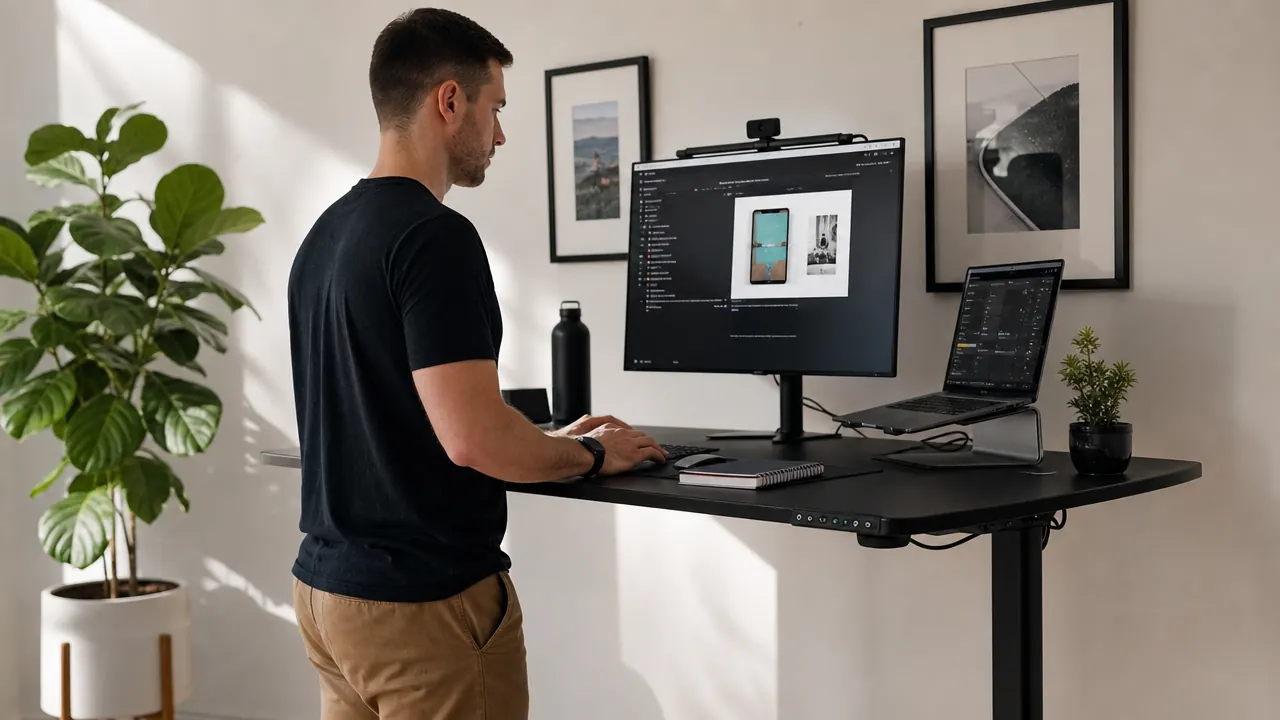
By March of last year my lower back was done tolerating eight hours a day in a cheap office chair. I had a diagnosed L4-L5 disc issue since 2023, nothing surgical, just the kind of nagging pain that turns three p.m. into a countdown to standing up. My physical therapist had told me to alternate sitting and standing every 45 minutes. I had been ignoring that advice because I did not own a standing desk and had convinced myself the good ones were too expensive. Then I found the ErGear 48-inch electric standing desk for under $160. I ordered it skeptically. That was eight months ago, and I have used it every single workday since. This review covers what I actually found.
The Quick Verdict
Solid motor, honest memory panel, wobble-free below 45 inches. The best under-$200 electric desk I have tested for a home office that does real work.
Amazon Check Today's Price →Your back is telling you something. The ErGear is under $160 and ships free.
Over 11,000 Amazon reviewers. 4.5 stars. Memory presets for sitting and standing height so you actually use it every day. Check today's price before the next coupon expires.
Amazon Check Today's Price on Amazon →How I Have Used It
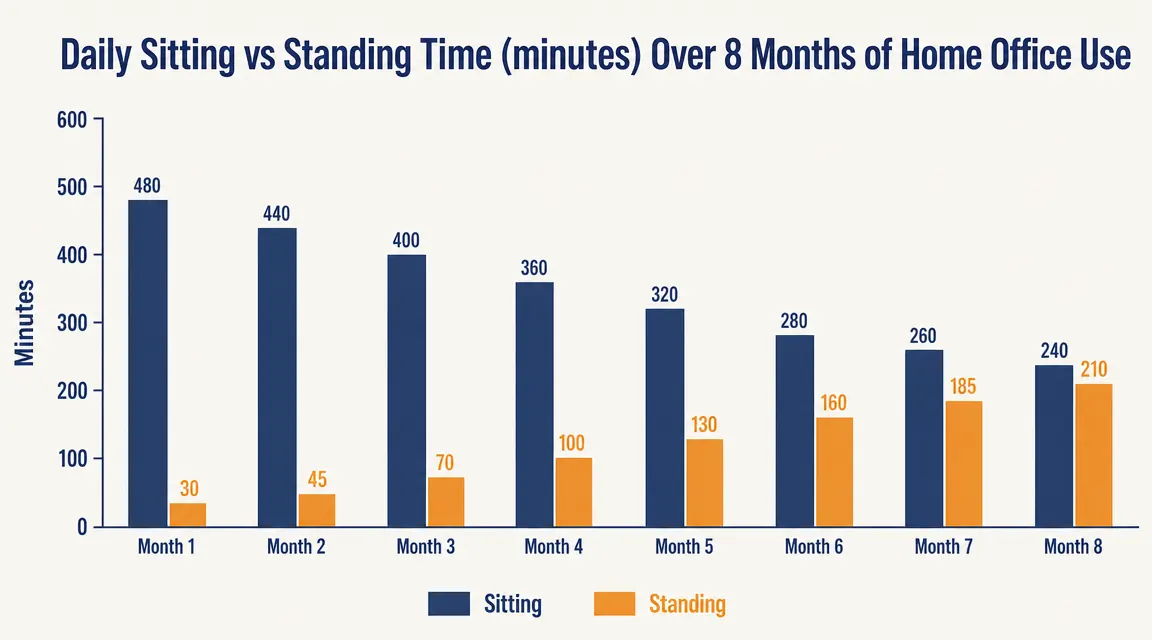
My setup is a 48 x 24-inch black ErGear surface with a 27-inch Dell monitor, a 14-inch MacBook on a riser beside it, an external keyboard, and a mouse. Total surface load is around 35 lbs. I work in a 10 x 11-foot spare bedroom that doubles as an office. I have programmed preset 1 at 28.5 inches for seated height and preset 2 at 43 inches for standing. I do not stand for hours. I stand for 30 to 50 minutes at a stretch, usually in the mornings and again after lunch. The desk transitions between those heights in about nine seconds.
Assembly took me 47 minutes working alone. The instructions are a step-by-step diagram sheet, not a novel. The legs come pre-assembled. You attach the crossbar, drop the surface on top, plug in the control box, and tighten twelve bolts. The included hex wrench is undersized and I swapped it for my own, but that is a minor gripe. First adjustment out of the box worked on the first try.
The routine change was gradual. The first two weeks I stood maybe once a day, mostly to test the mechanism. By week four I was standing twice a day without thinking about it. By month two it was a real habit, tied to specific triggers: stand when the first call of the morning ends, stand again after lunch. Eight months in, standing for 30 to 45 minutes at a time feels normal rather than effortful. That shift matters more than any hardware spec. The desk made the habit easy enough to keep.

Motor and Height Range After 8 Months
The ErGear uses a dual-motor lift system. Height range is 28 to 47.6 inches, which covers almost any sit-stand combo for people between 5'2" and 6'4". I am 5'11" and my elbow-height standing position lands at 43 inches with shoes on, well within the ceiling. My seated position is 28.5 inches, two inches inside the floor. Range is not an issue for most home office users.
After eight months and somewhere north of 400 transitions, the motor still moves at the same speed it did day one. No grinding, no hesitation, no error codes. The weight capacity is listed at 176 lbs. I am running about 20 percent of that. Whether it would hold up under a dual-monitor desktop setup at full load long term, I cannot say from my usage. What I can say is that moderate home office loads give this motor no trouble whatsoever.
Noise is real but not disruptive. The motor hum during adjustment is audible on a video call if I forget to mute. It is not a jackhammer. It is closer to a window air conditioner cycling on. I mute before adjusting out of habit now. If you share a wall with a sleeping partner or a toddler during nap time, be aware of this.
I had told myself a standing desk was a luxury. Eight months later, the thing I notice most is that I never hit the three p.m. wall as hard as I used to. Standing for 30 minutes after lunch changed that.
Surface, Frame, and Wobble
The black MDF surface has a smooth matte finish. After eight months it has no scratches from daily keyboard and mouse use, one faint scuff near the edge where I rest my wrist, and no delamination on the corners. It is not a solid hardwood desktop. Do not expect that at this price. But it is flat, it does not flex under load, and it looks fine in a standard home office.
Wobble is the question everyone asks about a budget standing desk, and this is where I want to be precise. At seated height, 28 to 30 inches, there is essentially no wobble under normal use. At my standing height of 43 inches with a full monitor setup, there is a small but perceptible wobble when I type hard or bump the frame. It does not move my monitor or throw off my mouse. It is the kind of give you feel rather than see. At 47 inches, near the top of the range, the wobble increases and I would not want to type at that height without an anti-fatigue mat and a deliberate touch. For the vast majority of users at normal elbow height, it is not a problem. It is worth knowing.
The Memory Panel and Whether You Will Actually Use It
The control panel has four memory presets, a display showing height in inches or centimeters, and a child lock. I use presets 1 and 2 every day. The muscle-memory of pressing a single button to stand makes the habit actually stick. When I had to manually crank a fixed-height desk at a coworking space years ago, I stood maybe twice a week. With the ErGear, I am averaging four to six transitions per workday. The memory feature is not a gimmick. It is the thing that makes a standing desk a standing desk instead of a one-time curiosity.
Setting the presets takes about 30 seconds. Hold the up or down button until you reach your target height, then press and hold a memory button for three seconds until the display flashes. Done. The presets hold through power cycling. I have never had to reset them.
What I Would Change
Cable management is an afterthought. There is no built-in cable tray and no routing holes in the surface. If you have a monitor cable, a laptop charger, a USB hub, and a desk lamp, you will have a cable situation. I added a cheap under-desk cable management tray from Amazon for $14 and that mostly solved it, but it should not be an add-on purchase. If you care about a clean desk, budget for it. If you are wrestling with cable clutter across your whole setup, a docking station can help consolidate the mess to a single cable run from your laptop.
The surface at 48 inches wide is genuinely enough for a single-monitor laptop setup. If you want to run dual 27-inch monitors side by side plus peripherals, you will feel cramped. ErGear makes a 55-inch and a 63-inch version. For most people building a focused home office, 48 inches is fine. But know your setup before you order.
Last thing: the hex bolts that hold the legs to the frame got slightly loose around month five. A five-minute tightening check fixed it permanently. I check them every few months now. Not a dealbreaker, but it is a reminder that this is a budget frame, not a $600 Uplift. If you want a desk you absolutely never have to maintain, that expectation does not match this price point. At this price, a quarterly bolt check is a fair trade.
What I Liked
- Dual-motor system moves smoothly and quietly enough for shared home office spaces
- Four programmable memory presets make the sit-stand habit actually stick
- Height range of 28 to 47.6 inches covers nearly every home office user
- Solid, flat surface holds up to daily keyboard and mouse use without delamination
- Assembly is a genuine 45-minute solo job, no extra tools needed
- Over 11,000 Amazon reviews with 4.5 stars gives you confidence at this price point
Where It Falls Short
- No built-in cable management tray, plan to add one
- Perceptible wobble above 44 inches under heavy typing
- Motor hum is audible on video calls if you forget to mute
- Frame bolts loosened slightly around month five and needed a tightening check
- 48-inch surface is tight for a dual-monitor setup

How This Compares to Other Options I Considered
I looked hard at the FlexiSpot E5 before buying the ErGear. The FlexiSpot has a more stable frame at standing height and a better warranty, and it costs about $100 more. If you are building a permanent, heavy-use desk setup and want to spend once for the long term, the FlexiSpot deserves a serious look. If you want a capable electric standing desk for under $160 to test whether the habit works for you, the ErGear is the honest answer. I cover the full comparison, including side-by-side stability and motor specs, in my ErGear vs FlexiSpot breakdown if you are deciding between them.
I also considered a manual crank desk at around $80. After three weeks of use, I am convinced manual cranks are how standing desks become coat racks. The friction of cranking breaks the habit. The 15 to 20 seconds of effort to crank is not much in isolation, but it is enough to make sitting feel easier every single time. If you are serious about standing regularly, electric with memory presets is the only setup worth buying.
Who This Is For
The ErGear is the right desk if you work from home full-time or most of the week, you are building a dedicated home office setup on a practical budget, you have never owned a standing desk and want to test whether the habit helps before spending $400 or more, and you are running a single-monitor or laptop-plus-monitor setup. It is also a solid pick for students, freelancers, and anyone with a 9-to-5 remote job who simply needs a real dedicated work surface rather than a folding table or dining room chair compromise.
Who Should Skip It
Skip the ErGear if you need dual 27-inch monitors and a wide keyboard tray side by side and do not want to feel cramped. Skip it if you are above 6'4" and need the desk over 47 inches regularly. Skip it if cable management aesthetics matter a lot to you and you do not want to buy accessories. And skip it if you want a desk you will never have to tighten a bolt on because you want zero maintenance. For all of those cases, step up to the FlexiSpot E5 or Uplift V2 and accept the higher price. They are worth it for that specific profile. For most people reading this, the ErGear is not a compromise. It is the right call. If you want to understand what goes into setting up the full desk ergonomically, my guide on how to set up a home office standing desk walks through every adjustment, height calculator and all. And if you are curious how a standing desk alone changed my afternoon energy, the reasons are more concrete than you might expect. I lay out ten of them in the electric standing desk productivity piece.
Eight months in, I would buy it again. Here is today's price.
The ErGear 48-inch electric standing desk. Dual motor, four memory presets, 176 lb capacity, assembly in under an hour. Check the current price on Amazon and see if the coupon is still live.
Amazon Check Today's Price on Amazon →