

Here is the situation a lot of home office workers end up in. You have a laptop, two monitors you want to run side by side, a wired keyboard, a mouse, a webcam, a USB microphone, and a phone that needs charging. Your laptop has two USB-C ports. You do the math and it does not add up. So you start searching for a hub or docking station and immediately run into the Selore 14-in-1 and Anker USB-C options sitting next to each other on Amazon, priced within a few dollars of each other, both with thousands of reviews. Which one actually handles a real dual-monitor home office setup?
The short answer: the Selore 14-in-1 wins for anyone running dual monitors from a laptop. The Anker hub is a solid piece of hardware for lighter use, but its display output limits make it the wrong tool for a two-screen desk. Here is a full side-by-side breakdown so you can see exactly why.
| Selore 14-in-1 | Anker USB-C Hub (7-in-1) | |
|---|---|---|
| Total Ports | 14 ports | 7 ports |
| Dual Monitor Support | Yes, 2x HDMI 4K at 30Hz or 1x 4K at 60Hz | No, single display only |
| Laptop Charging (PD) | 85W Power Delivery | Up to 100W Power Delivery |
| USB-A Ports | 4x USB-A 3.0 | 2x USB-A 3.0 |
| Card Reader | SD + microSD | SD only |
| Ethernet | Gigabit Ethernet (RJ-45) | Not included |
| Form Factor | Rectangular hub, 6.3 inches | Compact oval, 4.3 inches |
| Amazon Rating | 4.4 stars, 21,800+ reviews | 4.5 stars, 30,000+ reviews |
| Price (approx.) | Around $53 | Around $36 |
Stop cable-juggling every morning. The Selore gives you every port you need in one place.
14 ports, dual 4K HDMI, Gigabit Ethernet, and 85W laptop charging. Over 21,000 home office buyers on Amazon agree it delivers.
Amazon Check Today's Price on Amazon →Where the Selore 14-in-1 Wins
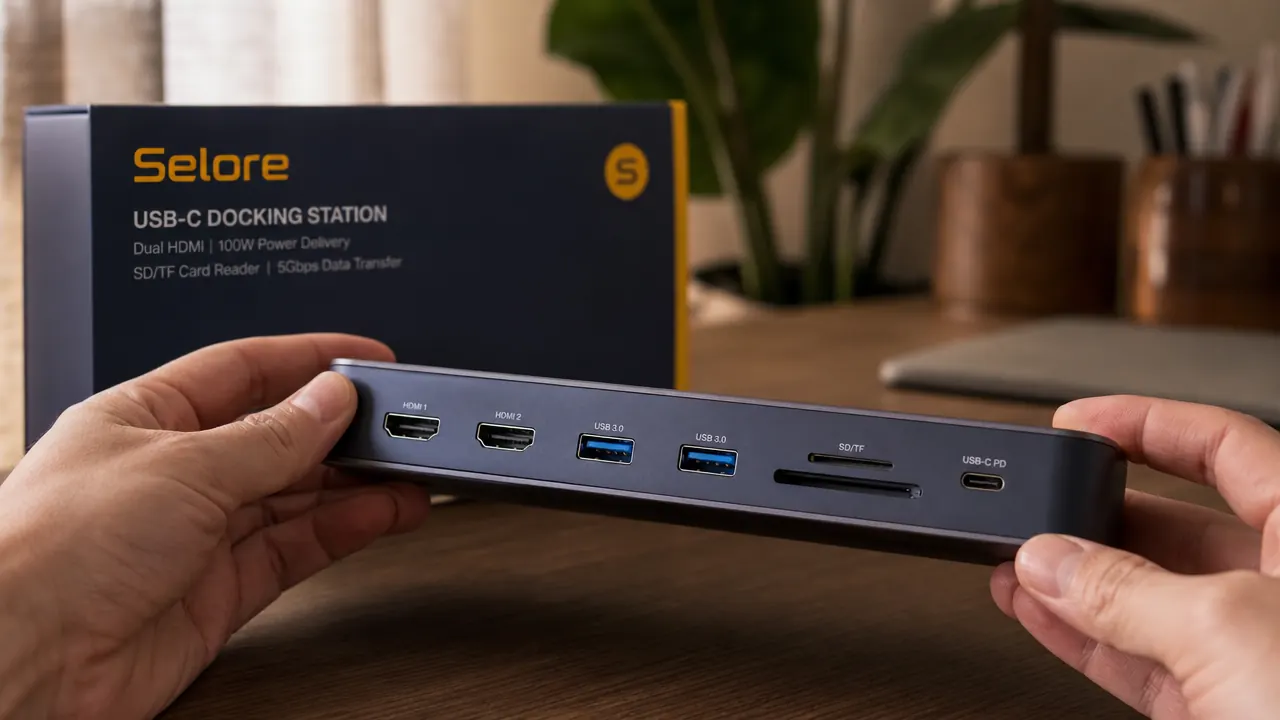
The single biggest advantage the Selore has over the Anker hub is dual HDMI output. If you want two monitors on your desk, you need a dock with two display connectors. The Anker 7-in-1 has one HDMI port. That is it. You can connect one external monitor and that is your ceiling. The Selore has two HDMI ports and officially supports triple display output when you count the laptop screen. That is the difference between a real workstation and a slightly upgraded single-screen setup.
Beyond displays, the port count gap matters in a busy home office. The Selore gives you four USB-A 3.0 ports versus two on the Anker. That means webcam, USB microphone, wireless keyboard receiver, and an external drive can all plug in simultaneously without needing a second hub. It also adds Gigabit Ethernet, which the Anker skips entirely. If you ever work on large file transfers, video calls, or just want a stable connection that does not depend on your apartment building's Wi-Fi congestion, that wired Ethernet port is genuinely useful. And having both an SD and a microSD slot is a small thing, but if you pull footage from a camera or drone it saves you from hunting for a separate adapter.
For home office users comparing price per port, the math favors the Selore. You pay a bit more upfront, but you are getting 14 ports instead of 7. The Anker comes out to roughly $5 per port. The Selore comes out to under $4 per port. More capability, lower cost per function. The only tradeoff on this side of the ledger is a slightly larger physical footprint, which we will get to shortly.
Where the Anker USB-C Hub Wins
The Anker is not a bad product. It is just the wrong product for a dual-monitor desk. On the things it does, it does them well. The build quality on Anker hubs has a long track record, and the 7-in-1 is no exception. The aluminum shell feels dense and stays cooler under load than some competing hubs at this price. The power delivery tops out at 100W on select Anker models, which beats the Selore's 85W if you have a laptop that sips power aggressively, like a 16-inch MacBook Pro under full CPU load.
The form factor is the other genuine win. The Anker hub is compact enough to slip into a laptop bag and forget it is there. If you work from coffee shops two days a week and want something that travels without adding bulk, the Anker 7-in-1 makes more sense. It is a portable hub that works well at a single-monitor desk at home and doubles as a travel companion. The Selore sits on your desk and stays there. It is not large, but it is not pocket-sized either. For a purely fixed home setup the size difference does not matter. For anyone who moves between locations it does.
The Anker is a great hub for one monitor and a laptop bag. The Selore is what you buy when you are building a real desk.

A Note on Heat and Stability
Any hub or dock that pushes dual 4K output and 85W charging through a single USB-C connection is doing a lot of electrical work. The Selore runs warm under a full load, which is normal for a dock in this class. It is not hot enough to be alarming or damage your desk surface, but if you rest your hand on it during a four-hour work session it will feel noticeably warm. Running both HDMI ports at 4K 30Hz while charging the laptop and transferring files is the worst-case scenario. In typical use, with one monitor at 4K 60Hz and passive USB peripherals, it stays at a comfortable temperature.
One thing worth knowing about the Selore's dual 4K support: when you run both HDMI outputs at the same time, the maximum resolution drops to 4K at 30Hz per display rather than 60Hz. For most productivity work, spreadsheets, documents, video calls, browser tabs, the difference between 30Hz and 60Hz on a monitor is not something most people notice. If you edit video or play games through your laptop, 30Hz on a monitor will feel sluggish. In that case you would want to run one display at 4K 60Hz through the Selore and live with a single external monitor, or look at a Thunderbolt 4 dock at a significantly higher price point.
Compatibility: Mac, Windows, and ChromeOS
Both the Selore and Anker hubs work across Mac, Windows, and ChromeOS laptops with a USB-C or Thunderbolt port. There is no driver installation needed for either. You plug in the USB-C cable and the ports light up. On a MacBook, the dual-monitor behavior depends on which chip your Mac has. M1 Macs natively support only one external display through software limitations. M2 and M3 Macs fixed this with DisplayLink support or updated firmware depending on the model. If you have a MacBook Air with an M1 chip and you want dual external monitors, neither this dock nor any other dock will solve that without DisplayLink software and a USB display adapter, which is a separate issue. On Windows laptops and newer Macs, dual 4K through the Selore works without any extra steps.
The Selore also supports up to three displays simultaneously if you count the laptop screen. So a typical setup would be: laptop open and running as a third display, two external monitors connected via the HDMI ports. That is a functional triple-monitor home office workstation running off one USB-C cable from a sub-$60 dock. For remote workers who switched from a corporate office with multi-screen setups, this is the closest you can get without spending several hundred dollars on a Thunderbolt dock.

Who Should Buy the Selore 14-in-1
The Selore 14-in-1 is the right choice if your desk has two monitors or you plan to add a second one, you work from a fixed home office setup most of the week, you want to eliminate the USB adapter pile from your desk (the SD card readers, the Ethernet adapters, the extra USB hubs), and you are working from a Windows laptop or a newer Mac that supports dual external displays. It is also the better choice if you have a lot of USB-A devices because four ports is simply twice as many connection points as the Anker.
If you are on a very tight budget and you only ever use one external monitor, the Anker is a legitimate alternative and will save you about $17. But if there is any chance you will add a second monitor in the next year, buy the Selore now. Buying the Anker, then discovering you want a second monitor, then buying a Selore anyway means you paid $36 for a hub you no longer need. The Selore also cross-links well with the rest of a tidy cable-managed desk. For more on how a docking station fits into a clean home office setup, see our piece on 10 reasons a USB-C docking station cleans up your home office and our long-term review of the Selore 14-in-1 where we cover six months of daily use on dual 4K monitors.
Who Should Buy the Anker USB-C Hub
The Anker 7-in-1 makes the most sense if you are working from a single monitor at home, you travel frequently and want one hub that covers home and on-the-road, your laptop's USB-C port charges at above 85W and the full 100W pass-through matters to you, or you simply do not need Ethernet and the extra USB-A slots. It is a cleaner, more portable product for lighter use. For a student setting up a first home office with one monitor, or a hybrid worker who only uses a dock two days a week, the Anker delivers what you need and keeps money in your pocket.
Running two monitors from a laptop? The Selore is what you need.
Dual HDMI, Gigabit Ethernet, four USB-A ports, and 85W laptop charging, all in one cable. The Selore 14-in-1 is one of the most capable docks under $60 on Amazon.
Amazon Check Today's Price on Amazon →